Yavor Georgiev

Yavor is a PM at Snowflake working on developer experience. Previously at Docker, Auth0, Hulu, and Microsoft Azure.

Azure SDK for Node.js 0.5.3 is out

17 February 2012

We just pushed out a small February update (0.5.3) to the Azure SDK for Node.js, containing the following fixes:

  • #81: Start-AzureEmulator errors if there’s a space in the service path: we corrected an issue where the emulator would fail if there was a space in the path to the service
  • #82: Remove-AzureService prompts for yes/no confirmation: when you want to remove a service, you will now see this prompt to prevent accidental data loss: Confirm: Are you sure you want to remove service "foo"?
  • #131: Start-AzureEmulator -Launch fails if run twice on the same web role: corrected a problem where our attempt to clean up logs was causing the emulator to crash
  • #138: Publish-AzureService throws ArgumentNullException when no certificates element provided in .cscfg: this may have affected folks using the Mongo commandlets
  • #141: Worker role did not allow write access: the user under which Node was running in worker role did not have sufficient permission to write to disk. This may have surfaced as some modules who need to write to disk (such as stylus) failing.

    Here is a one-click install of the new bits.

    Alongside this, we also released a refresh (0.5.2) of the npm package for Azure, adding support for accessing ServiceBus queues and topics, among other fixes. Read Glenn’s blog post for more details.

    Read More

    Node.js/express blog on Azure in 5 minutes

    13 December 2011

    Following up on the announcements and demos shown at today’s Learn Windows Azure event, I decided to put together a very quick demo that gets you going on Azure with a real app as fast as possible. 

    I decided to modify express’ blog sample to use Azure storage, and also pre-configured all the service/role settings that Azure needs so you can get going as fast as possible.

    Here is the 5-minute recipe:

    1. Get your Windows Azure account
    2. Get the Windows Azure SDK for Node.js
    3. Get the sample source code from GitHub. If you are wondering where some of the static content in the sample came from, check out this getting started document.
    4. Get the needed Node packages by running this inside the ExpressBlog\WebRole folder:
      npm install
    5. You should now be able to launch the Windows Azure PowerShell for Node.js shortcut from your start menu. Make sure you run as Administrator. The rest of the steps here should be completed from that shell.
    6. Download your Azure publish settings:
      Get-AzurePublishSettings
    7. Import the settings:
      Import-AzurePublishSettings mine.publishsettings
    8. Head to the Azure portal and create a storage account under your subscription. Make note of the account name and access key.
    9. Modify the ExpressBlog\WebRole\Web.cloud.config file where indicated to include the storage settings.
    10. You are now ready to publish. Anywhere inside the ExpressBlog folder, run the following, making sure you use a unique service name:
      Publish-AzureService -Name uniqueServiceName
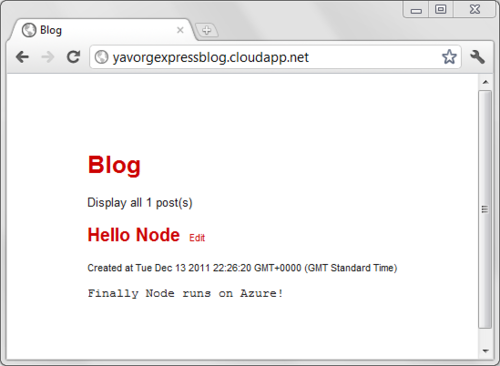
    A Node/Express blog on Azure

    You’re all done!

    Unfortunately things don’t always go according to plan, so in case you get an Internal Server Error or anything else goes wrong after you deploy to the cloud, use this simple trick to debug.

    1. Inside the Web.cloud.config file, enable logging:
      <iisnode loggingEnabled="true" />
    2. Redeploy the service by simply typing:
      Publish-AzureService
    3. Look at the Node.js log file for hints of what may be wrong at http://uniqueServiceName.cloudapp.net/server.js.logs/0.txt

    Read More
    RIA Services SP2 RTW released

    09 December 2011

    We’re happy to announce the final release of WCF RIA Services V1 SP2:

    In this release, we add the following new features:

    • Support for Silverlight 5 (the standalone installer linked above also supports Silverlight 4)
    • DateTimeOffset support + various bugfixes
    • Entity Framework Code-First development, using this NuGet package

    Known issues include:

    • Entity Framework 4.1 is required, but version 4.2 isn’t supported yet
    • Requires Visual Studio 2010 or SP1. Visual Studio 11 isn’t supported yet
    • Work on supporting Universal Providers for improved Windows Azure deployment is ongoing
    • If you want to create a Silverlight 4 Business Application Template, first create an instance of the Silverlight 5 template, and then use the Silverlight project properties to retarget it to Silverlight 4. You might see some temporary errors (System.Windows.Markup.XamlParseException) in the designer and error window, but rebuilding will make those disappear.

    Read More

    Configuring GitHub Mac client proxy

    04 November 2011

    Trying to clone a repo using the GitHub for Mac client at work today was failing due to our proxy server. All my repos would show up, but they would fail when cloning, and trying to synchronize wouldn’t work either. I know I am sitting behind a HTTP proxy at work, but I assumed the GitHub client would just inherit the proxy settings already defined in the OSX preferences. Apparently not… so I hunted around the app to try and find dedicated proxy settings. Again, no luck here, but after looking around forums I discovered you could use the command line to set the proxy:

    git config --global http.proxy http://proxy:port
    

    I restarted the GitHub client, and now it would happily clone and sync my repos.

    Read More